|
How to plot an
EPI graph |
|
Chong Ho Yu, Ph.D.
|
Problem
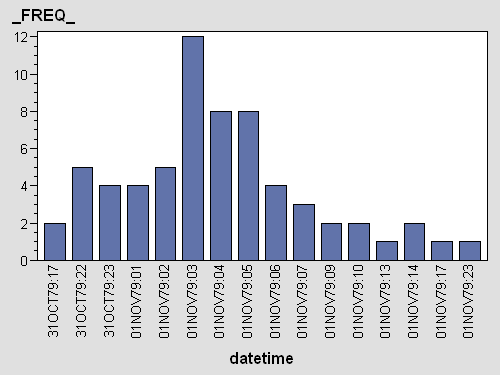
To investigate an outbreak, epidemiologists usually plot the frequency
of cases against the timeline. The dataset may contain a date variable and
a time variable. However, if you concatenate date and hour by using the
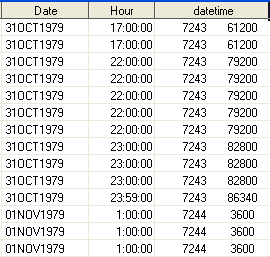
syntax like "datetime = date||hour", it will return the numeric
representation of the date and the time.
|
Incorrect concatenation
 |
Solution
You can use the function DHMS (Date-Hour-Minute-Second) to
generate a correctly formatted date-time variable. Although in most
cases you don't need minutes and seconds, the full function must be
called. You can use formatting to suppress minutes and seconds. For
example, to show date, hour, minute, and second, you need datetime18.
To show date and hour only, you just need datetime12.
|
|
SAS program for plotting an EPI
graph
data table1b;
set
table1;
datetime=dhms(date, 0,
0,
hour);
format
datetime
datetime12.;
if datetime NE
" "
then
case = 1;
run ;
proc
summary
data=table1b;
class
datetime; var
case; output
out=outbreak
sum=sum;
run ;
data outbreak;
set
outbreak;
if _TYPE_ =
0
then
delete;
run;
goptions
reset=all
device=actximg;
ods
html
file="outbreak.html";
proc
gchart
data=outbreak;
vbar
datetime /sumvar=_FREQ_
discrete
; run;
goptions
reset=all
device=actximg;
quit ;
|
E
P
IG
R
A
P
H |

|
Navigation
|