Chong-ho (Alex) Yu, Ph.D., & James Carvalho
|
Special thanks to Eldon Norton, who reviewed the source code and suggested ways to improve its efficiency.
Analysis of user access log of a web server is helpful in many ways. For instance, an instructor who
offers web-based courses can find out which students access the site more often, what pages
are more popular, when the prime time is, and so on. This information can provide an empirical base
for the instructor to modify his/her instructional strategy.
However, the raw access log is very "ugly." It is only a text file and thus is difficult to read. The following
is an example of user access log data:
  134.139.129.33 - - [04/Mar/1998:17:05:32 -0700] "GET /~alex/home.html HTTP/1.0" 200 3562
  134.139.129.33 - - [04/Mar/1998:17:06:18 -0700] "GET /~alex/home.GIF HTTP/1.0" 200 4608
  204.38.7.171 - - [04/Mar/1998:17:06:50 -0700] "POST /alex/search.html HTTP/1.0" 200 15458
  204.38.7.171 - - [04/Mar/1998:17:06:50 -0700] "GET /alex/button.gif HTTP/1.0" 200 5856
  204.38.7.171 - - [04/Mar/1998:17:06:50 -0700] "GET /swa/bground1.gif HTTP/1.0" 200 9243
|
Today there are quite a few software tools for analyzing a user log. In my experience there are
several drawbacks of those software packages: Some of them such as AccessWatch are CGI-based and thus it is difficult to customize
them. On the other hand, some of them such as Andromedia, Whirl, Insight, and Internet Manager are more flexible but are extremely expensive.
The advantages of using SAS to analyze user logs are: First, a SAS programmer can
manipulate the data in the way he/she wants. Second, SAS is available in many institutions. The additional
cost for the project is only the cost for SAS/IntrNet. This write-up will illustrate how you can clean up the access log
and present useful results on the Web.
Linking user log with SAS
If SAS and SAS/IntrNet are not installed on the same server where the Web server is situated, you have to create
a link between SAS and the targeted user log. There are several ways to accomplish this task. You can mount a Network
File System (NFS) volume that can be recognized by both computers, or you can simply issue a "FTP" command
in SAS (see below). After the link is established, SAS can read the data in the data step.
	filename indata FTP 'filename_of_the_access_log' cd='full_path_of_the_access_log'
                    user='your_login_name' host='web_server_hostname' pass='your_password';
|
Extracting relevant data
You don't need everything
in the user log. Typically what you need are the IP address (From where did the users look at your website?),
the date and time (When did they read it?), and the hit (What did they look at)? Therefore you can use
dummy variables as shown below to skip all other unnecessary data. To save memory space, you should
drop all dummy and temporary variables after the data step is finished.
	Data one (drop=temp2 temp dummy0-dummy7 datetime);
   			infile indata firstobs=3 missover;
   			length ip $ 15 datetime $ 21 hit $ 40 temp2 $ 40
        	date $ 2 mth $ 3 year $ 4 hour $ 2 min $ 2;
   			input ip $ dummy0 $ dummy1 $ datetime $ dummy2 $ dummy3 $
        	page $ dummy4 $ dummy5 $ dummy6 $ dummy7 $;
|
The above selection works
very well if the primary function of your website is to display information. However,
you may want to read more data if your server performs more functions. For
example, in the previous user log example, right after the data and time data there are
"action" data. The "action" is either "get" or "post." If a user reads the
displayed information only, the action is "get." If your homesite allows
a user to submit a query to search a database or upload a form to your
server, then the action will be "post." A web-based instructor may want to find
out the ratio between "get" and "post." (How many students use the search engine?
How many sttudents post questions or submit homeworks?)
In addition, the last portion of the user log is the protocol information. Again, if
the role of your website is a showroom of information, then "HyperText Transport
Protocol" (http) should be the only protocol. But if you allows users to download
software from your site, then the downloading may use either "http" or "ftp"
protocol.
Usually the user log may contain headers or some blank space in the beginning, therefore you should check
the user log first to find out which line should be the beginning of the actual data. In this example, line
three is the beginning and thus "firstobs=3" is inserted. Further, sometime the user log may have missing data
at the end of the line. To avoid messing up the data, you should insert the code missover.
Some variables have fixed-length values such as "IP Address," but some have varied-length values such as "hit."
(the URL of the object being downloaded to the browser e.g. "./alex/computer/sas/sas.html" and "./alex/computer/spss/ver10/group4/lesson1/example/example10.jpeg")
Variables with varied-length string could cause misreading of data. Therefore you should assign a proper
length to each variable.
To extract user activity data of a particular website from the user log, you should retain only the relevant data and delete
all others. You can check which entries are related to the target website by using a substring(substr) function. In
this example (see below), the substring function starts to scan the "hit" from the second position and check
four columns only. If the entry is "/alex/index.html", the function would keep the record, otherwise it
erases the record in the memory of the SAS program (not in the actual user log).
if substr(page,2,4) ne 'alex' then delete;
|
Cleaning up IP numbers
Many people use a counter to keep track of the number of visits to the homesite. However, a counter could not
differentiate users and workers who work on the website. When I develop a website, I may check the site more
than ten times. These counts are misleading for analyzing the website traffic. Therefore, I recommend to
delete all the entries that originated from yourself and your colleagues who are involved in developing the pages. To do this,
simply discard the records if the IP numbers belong to you or your coworkers (see below).
Moreover, it is helpful to find out how many accesses occur within your organization and how many are from
external web surfers. The first sixteen bits of the IP address indicate the origin of the access.
You can use the substring function from SAS to classify the IP address into two groups: "Campus-access" and "Outside-access".
	if ip in ( "129.219.12.22", "129.219.11.46", "129.219.19.14","129.219.48.15",
	       "129.219.12.30","129.219.11.17")
   		then delete;
	if substr(IP,1,7) = "129.219" then IPAdd = "Campus-access";
   		else IPAdd = "Outside-access";
|
Cleaning up page access
In addition, it is important to distinguish "hit" from "page access." A hit includes every object accessed by the user
such as individual JPEG images, GIF images, WAV sound clips, HTML files and so on. If a user opens a webpage which has
two JPEG images and three GIF images, the total number of hits would be six. This statistic artificially
inflates the website traffic. On the other hand, a page access counts only the html page. I recommend using
the later because it reflects the usage of the website in a more accurate manner. The following SAS code
could perform the filtration task:
	temp = reverse(scan(reverse(hit),1,'.'));
	if upcase(temp) in ('GIF','JPG','JPEG') then delete;
	page = hit;
	page=put(page,$char40.);
|
To pull out non-HTML hits, first use the reverse function to reverse the "hit" string. Then use the scan function to locate the extension (.html, .jpg, .gif...etc). Because the extension names may be in both upper case and low case, use the upcase function to convert them into capital letters. Next, use an if-then statement to delete all non-HTML hits. In this example, only JPEG and GIF images are taken out. In your own implementation, you can take out other types of hits such as Shockwave movies, Java applets, QuickTime movies, Wave sound clips, and so on.
If SAS/IntrNet is present on
the same server which stores the website traffic data analyzed by SAS, then you should
exclude the HTML page of SAS/IntrNet, otherwise SAS counts your access to the user log
analysis as a user access. Although your IP address has been excluded from the count,
sometime you may check the user log from a different computer other than your own.
After the hits are cleaned up, assign the values of hit
into a new variable named "page," which stands for "page access."
Hotlinking page access
In SAS/IntrNet, the variable "page" will be used to display the frequency of page access of each webpage.
You can hotlink the display of the pages by using the following method:
	start="<a href=http://seamonkey.ed.asu.edu";
	middle=">";
	end="</a>";
	link=trim(page)||middle||trim(page)||end;
	link2=start||link;
|
To make a hotlinked text, first create several constants. The constant "start" carries the string of your
website and the HTML tag of starting a link. The constants "middle" and "end" contain the tags that
bracket the text to be hotlinked. To show a hotlinked text on the Web, concatenate the preceding constants
and the variable "page" in the proper order. To avoid empty tails, use the trim function to remove the tail of shorter string.
Cleaning up date and time
Date and time in the user log are together in a continuous string. The following SAS code divides the variable "datetime" into several different variables. First, the substr function extract the string carrying date and time information. Second, the compress function removes the slash so that the date/time string conforms to the standard SAS date/time format. Next, use different date functions to extract the month, year, hour, minute, and date information from the string.
	dt=input(compress(substr(datetime,2,17),'/'),datetime15.);
	month=month(dt);
	year=year(dt);
	hour=hour(dt);
	min=minute(dt);
	date=day(dt);
|
Erasing duplicates
In some situations such as a slow downloading process, the user may click the refresh/reload button several
times within a minute. This action improperly inflates the number of page accesses. To avoid duplication, you
can perform a sort of no duplicated unique key (nodupkey) on the variables "IP," "dt" and "page" (see below). If the same person looked at the same page at the same time (within one minute), only
the first page access will be kept.
	proc sort nodupkey;
   		by IP dt page;
|
Counting page access
Now the access log is clean and ready for analysis. You can compute the user log data in regular SAS procedures and later
convert the output as html pages by using SAS/Intrnet. The following proc summary is used to display the
frequency count of each page access. Also, the displayed pages are hotlinked.
	data two (drop=temp); set one;
		count = 1;
	proc summary data=two;
   		class page; var count; output out=new sum= ;
		proc sort; by descending count;
		proc print noobs data=new; var link2 count;
		title "Page access ranked by the number of accesses";
|
Counting page access by month
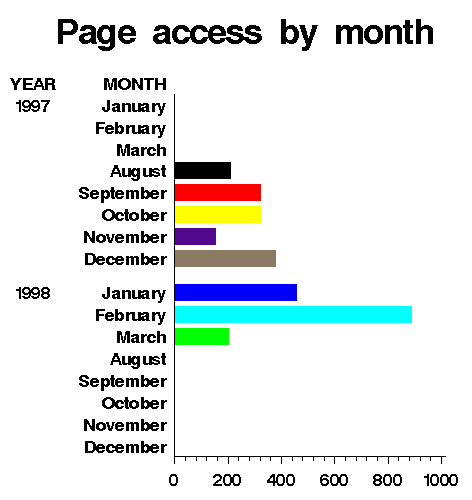
In the following, proc summary and proc chart are used to show the page access by month. A
graphical output is shown after the following source code.
	proc sort data=two; by month;
	proc chart data=two;
   		 	hbar month /group=year midpoints=1 2 3 4 5 6 7 8 9 10 11 12;
			title "Page access by month";
	proc summary data=two;
   			class month; var count; output out=new sum= ;
	proc sort; by descending count;
	proc print noobs data=new; var month count;
	title "Page access ranked by months";
|
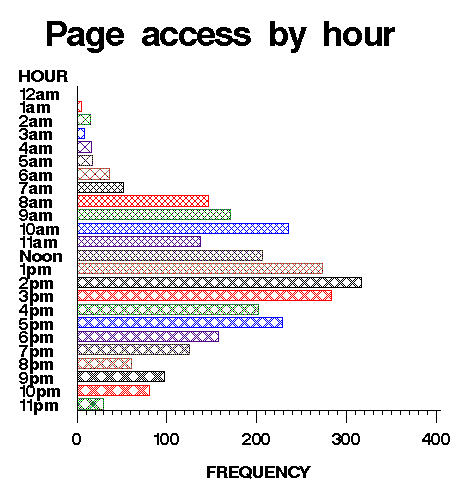
Counting page access by hour
The following module returns the page access ranked by hour. A grapical output is attached.
	proc chart data=two;
   			hbar hour;
	title "Page access by peak hour";
	proc summary data=two;
   			class hour;  var count; output out=new sum= ;
	proc sort; by descending count;
	proc print noobs data=new; var hour count;
	title "Page access ranked by hour";
|
Counting page access by location
This module shows the page access by location ("Campus-access" or "Outside-access").
	proc chart data=two;
   			hbar IPAdd;
	title "Page access by location";
	proc summary data=two;
   			class ipadd;  var count; output out=new sum= ;
	proc sort; by descending count;
	proc print noobs data=new; var ipadd count;
	title "Page access ranked by location";
	run;
|
Now you can pack the SAS output and show it on the Web by using SAS/IntrNet. However,
this step may not be necessary. If you are the only person who would analyze the
user log or you will share the user log info with your coworkers but they don't have
to read the result on the Web, you and your coworkers can simply read the SAS output on
your desktop or share it through a local area network.
Navigation
SAS tips contents
Computer write-ups contents
Simplified Navigation
Table of Contents
Search Engine
Contact
|